
Kyogle Council Community Map
The Kyogle Community Map provides a wide range of information including:
- property information throughout the Kyogle LGA
- planning and zoning information
- parks and community facilities
- environmental information
- ……and much more
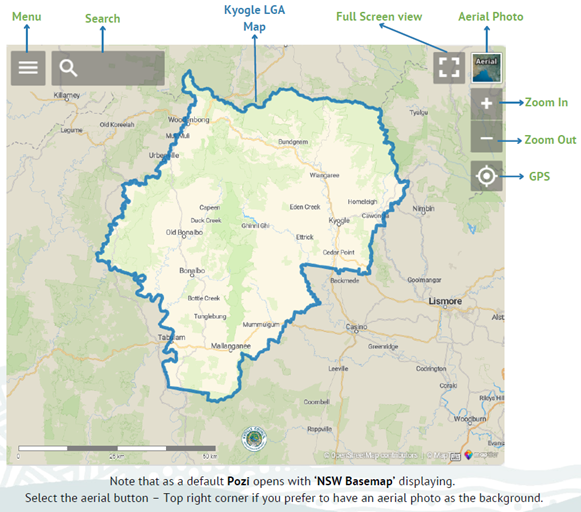
Using the Community Map
When you open the map, select the three lines on the top left-hand corner to access the layers panel.
The Mapping Layers
The layers panel allows you to select the information you would like displayed on the map.
The Kyogle Community Map has various mapping layers, some are sourced from internal Council departments, others from NSW state agencies.
Select the three lines at top left to display the Layer Menu.

Council-specific layers are listed in the top grouping – Council Layers.
Select a ‘sideways arrow’ to show each sub-category within the available layers.
Select the box to activate a layer. Multiple layers can be active at the same time. Note: layers higher in the menu order will overprint lower layers.
Layers will become visible as soon as they are selected, however, you may need to zoom in before a layer is visible, or drag the map to an area where that layer has content (eg Utility Lines mapping is restricted to towns and villages only).
Searching
The ‘magnifying glass’ menu item allows users to search for locations or layer information.
The default search opens an ‘Address Search’. This will allow you to search for any property address recorded in Council’s property register.
Select the address and open the Layers Menu to investigate.
Viewing layer attributes
Polygons, lines and points that appear in mapping layers have information stored with them.
Activate a layer in the community map to access this information.
‘Left click’ on a location of interest and the information will appear in the left-hand panel.
In the example below: the Council Layers / Property Layers / Land Parcels layer is active.
The user has selected ‘inside’ the Council Chambers polygon to view the attribute information held for this Land Parcel.
The same principle holds to view attribute information from any mapping layer.

Further functionality
The Kyogle Community Map allows users to take measurements or to save their own .png images or .pdf maps using the ‘Spanner’ tool from the menu bar.

Additional Help
Disclaimer
This interactive map displays property information, as well as Council facilities and services, by simply typing in or clicking on an address. This information has been derived from various sources, and while all care has been taken, is provided as a general guide and may not be suitable for legal, engineering or surveying purposes. Kyogle Council does not accept any responsibility for errors, omissions, or positional inaccuracies, although notification of any such errors is appreciated.
If you need assistance, please contact Kyogle Council by phone on 02 6632 1611 or by email using council@kyogle.nsw.gov.au
